iPad@CCC
All students purchase an iPad at the beginning of 1st Year.
All student iPads are managed by the school. This is to ensure the iPad is suitably restricted so that it is not a source of distraction or used for purposes other than for learning. For example, a list of allowed websites during school time can be seen in students’ Safari App under ‘bookmarks-allowed websites’
Parents can now manage their son/daughter’s iPad outside of school hours (5 pm) using JAMF Parent.
Students purchase an iPad from SelectTech – information on this process is communicated to parents after school places are offered.
iPads are fully set up by the school for each student.
This includes all eBooks, the core set of apps including Office 365 Suite, CorkETB student email address, and iCloud account.
Is this optional?
No, the iPad is required for all students.
Will books remain at home and iPads go to school?
Some teachers may wish to use the textbook in class. If that is the case, the book can be left in the College and the eBook used at home, thereby cutting down on the schoolbag weight.
Will these devices replace laptops for children who currently use laptops for learning support?
No. The iPad and laptop will both be used.
Can I use an iPad I already have for my son/daughter?
Yes. However, this iPad must be of sufficient storage (64GB or higher), in good condition and iOS 8 or higher. The recommended iPad cover must be purchased. The iPad must be wiped, and this iPad will be put into the school management system to be managed by the school. The iPad must be handed in to the school’s main office at the beginning of August to be set up correctly ahead of the start of term.
How does the College deal with lost/forgotten iPads?
Students’ names automatically appear at the bottom of the lockscreen. A lost iPad can also be disabled with a message on screen requesting its return to the main office. A command can be pushed for the iPad to ring in order to locate it. We have never had an iPad stolen.
Will students need a school Apple ID/account?
Yes. All students will receive a school Apple ID, which comes with 200GB of free iCloud storage. Details will be supplied alongside the iPad. The use of a personal or existing Apple ID is disabled.
Will schoolwork be saved to the Cloud?
Yes. The Microsoft Office 365 suite of apps, including Teams and OneNote, is used widely in the College. All data is saved to the cloud using these services. Students also have access to a private 1TB OneDrive account via Office 365 for storing files. Other work (photos, audio recordings, etc.) saved to the device can be backed up using the iCloud backup feature.
Can the device be added to the family iCloud account to ensure back up is maintained?
No. Students must only use their school Apple ID account, which will be supplied as part of their iPad delivery. All school Apple IDs come with 200GB of free iCloud storage, which is ample space to allow backups.
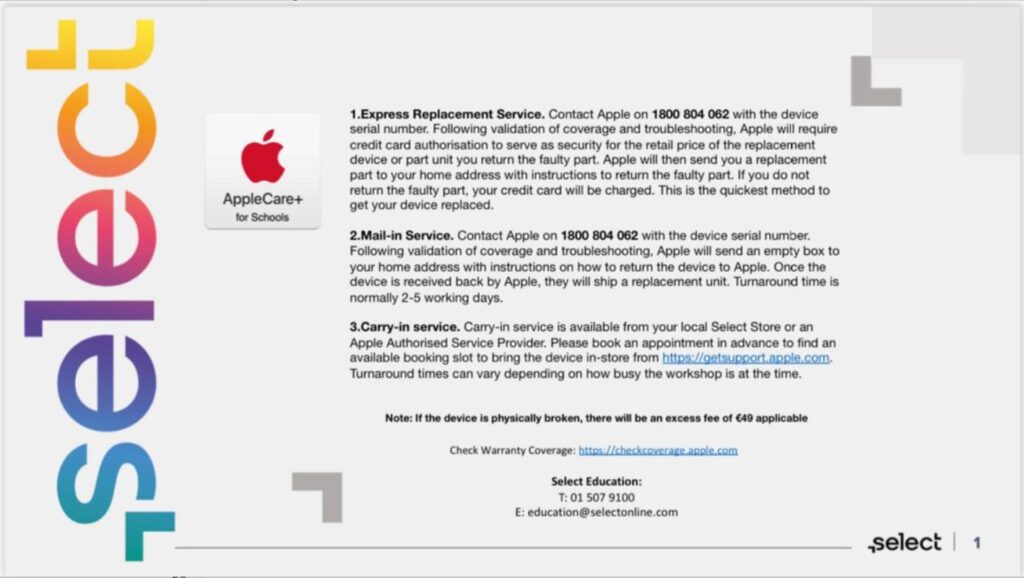
Who do I contact if my childs iPad is damaged, not charging properly etc?
If you have purchased Apple Care insurance, you should contact AppleCare+ directly – see image below: